
v4.5
2D Shader
CreatedJan 13, 2026
UpdatedJan 13, 2026
About this shader
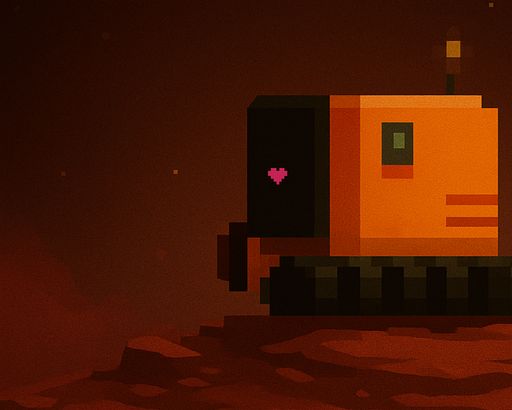
Converts that smooth 'vector' look into pixel art. Just slap it on a sprite or anything you want to pixelate and tweak the settings to get your desired look.
Shader Code
shader_type canvas_item;

// Controls for pixelation effect
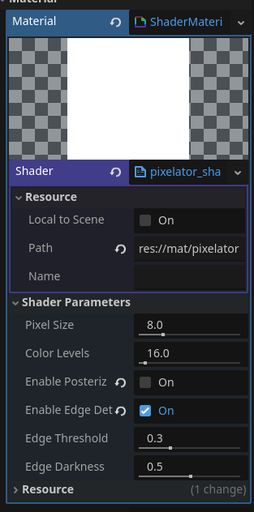
uniform float pixel_size : hint_range(1.0, 32.0) = 8.0;
uniform float color_levels : hint_range(2.0, 256.0) = 16.0;
uniform bool enable_posterize = true;
uniform bool enable_edge_detection = false;
uniform float edge_threshold : hint_range(0.0, 1.0) = 0.3;
uniform float edge_darkness : hint_range(0.0, 1.0) = 0.5;

void fragment() {
	vec2 uv = UV;

	// Pixelate: round UVs to nearest pixel block
	vec2 pixelated_uv = floor(uv * vec2(textureSize(TEXTURE, 0)) / pixel_size) * pixel_size / vec2(textureSize(TEXTURE, 0));

	// Sample the pixelated texture
	vec4 color = texture(TEXTURE, pixelated_uv);

	// Posterize: reduce color palette
	if (enable_posterize) {
		color.rgb = floor(color.rgb * color_levels) / color_levels;
	}

	// Optional edge detection for harder lines
	if (enable_edge_detection) {
		// Sample neighboring pixels
		vec2 pixel_step = 1.0 / vec2(textureSize(TEXTURE, 0));

		vec4 up = texture(TEXTURE, pixelated_uv + vec2(0.0, pixel_step.y));
		vec4 down = texture(TEXTURE, pixelated_uv - vec2(0.0, pixel_step.y));
		vec4 left = texture(TEXTURE, pixelated_uv - vec2(pixel_step.x, 0.0));
		vec4 right = texture(TEXTURE, pixelated_uv + vec2(pixel_step.x, 0.0));

		// Calculate edge strength
		float edge = abs(color.r - up.r) + abs(color.r - down.r) +
		             abs(color.r - left.r) + abs(color.r - right.r);

		if (edge > edge_threshold) {
			color.rgb *= (1.0 - edge_darkness);
		}
	}

	COLOR = color;
}
Live Shader Preview
This feature is currently in beta.
Keep exploring
Related shaders
More community shaders with similar tags and compatibility.
Community Discussion
0Join the discussion! Log in to share your thoughts.
Log In to Comment